
Introduction
The XP-Pen Deco 01 V3 drawing tablet works on my FreeBSD 15.1-STABLE desktop with KDE Plasma running Wayland. FreeBSD exposes the tablet through its native USB HID stack; libinput sees the tablet’s pointer, keyboard, and pen interfaces separately; and pen pressure works in both GIMP and Krita.
The tablet is detected by FreeBSD’s native HID support, and its separate pointer, keyboard, and pen interfaces are visible to libinput. I did not need OpenTabletDriver, and webcamd is not running in my working setup.
This article records the configuration and verification steps from my system. Device names and /dev/input/event* numbers can differ between computers and may change after reconnecting devices or rebooting. The commands and output below are a record of this machine, not universal device names to copy unchanged.
System and hardware
My test system:
| Component | Details |
|---|---|
| Operating system | FreeBSD 15.1-STABLE |
| Kernel | stable/15-n286063-3d5a0b722ebe |
| Architecture | amd64 |
| Desktop environment | KDE Plasma |
| Display protocol | Wayland |
| Tablet | XP-Pen Deco 01 V3 |
| USB vendor ID | 28bd |
| USB product ID | 0947 |
| Drawing applications | GIMP and Krita |
I verified the operating system and session with:
freebsd-version -ku
uname -a
echo "$XDG_SESSION_TYPE"
echo "$WAYLAND_DISPLAY"
The results on my system were:
15.1-STABLE
15.1-STABLE
FreeBSD alto.my.domain 15.1-STABLE FreeBSD 15.1-STABLE stable/15-n286063-3d5a0b722ebe GENERIC amd64
wayland
wayland-1
The important detail is that XDG_SESSION_TYPE reports wayland. The configuration described here is for my current KDE Plasma Wayland session, not an Xorg session.
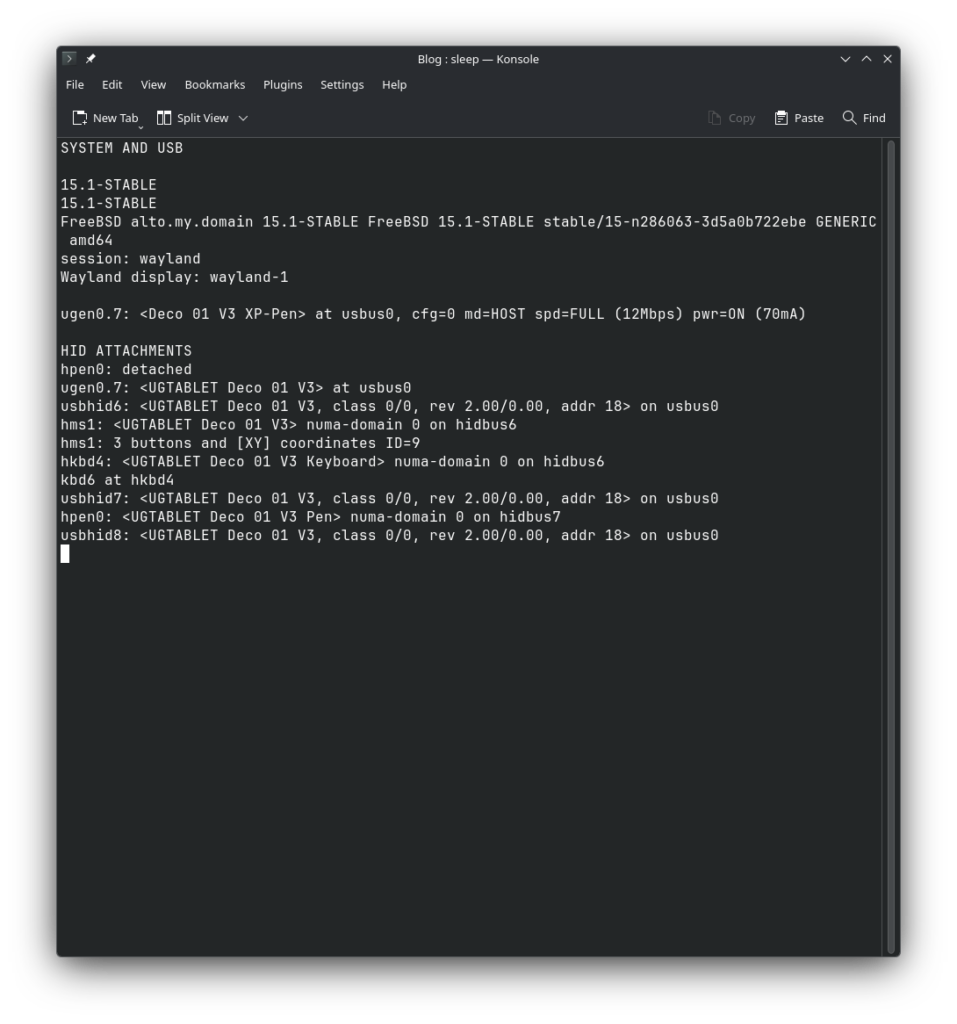
1. Confirming USB detection
I first checked whether FreeBSD could see the tablet on the USB bus:
usbconfig listThe tablet appeared as:
ugen0.7: <Deco 01 V3 XP-Pen> at usbus0, cfg=0 md=HOST spd=FULL (12Mbps) pwr=ON (70mA)Code language: HTML, XML (xml)The USB vendor and product identifiers are 28bd:0947.
The ugen device number shown above is specific to my system. It may be different on another computer or after reconnecting the tablet.
2. FreeBSD’s native HID detection
The next step was checking the kernel messages:
dmesg | grep -Ei 'UGTABLET|28bd|0947|hms|hkbd|hpen'The relevant lines from my output were:
ugen0.7: <UGTABLET Deco 01 V3> at usbus0
usbhid6: <UGTABLET Deco 01 V3, class 0/0, rev 2.00/0.00, addr 16> on usbus0
hms1: <UGTABLET Deco 01 V3> numa-domain 0 on hidbus6
hms1: 3 buttons and [XY] coordinates ID=9
hkbd4: <UGTABLET Deco 01 V3 Keyboard> numa-domain 0 on hidbus6
kbd6 at hkbd4
usbhid7: <UGTABLET Deco 01 V3, class 0/0, rev 2.00/0.00, addr 16> on usbus0
hpen0: <UGTABLET Deco 01 V3 Pen> numa-domain 0 on hidbus7
usbhid8: <UGTABLET Deco 01 V3, class 0/0, rev 2.00/0.00, addr 16> on usbus0Code language: HTML, XML (xml)
This shows FreeBSD attaching the tablet’s interfaces through its HID stack:
hms1identifies the pointer interface and its X/Y coordinates.hkbd4identifies the tablet’s keyboard interface.hpen0identifies the pen interface.
The kernel log also contained an earlier attachment followed by a disconnection before the current attachment. The lines above show the later, current device attachment; the earlier historical messages are not evidence of a current fault.
3. Checking the devices with libinput
I then checked what libinput could see:
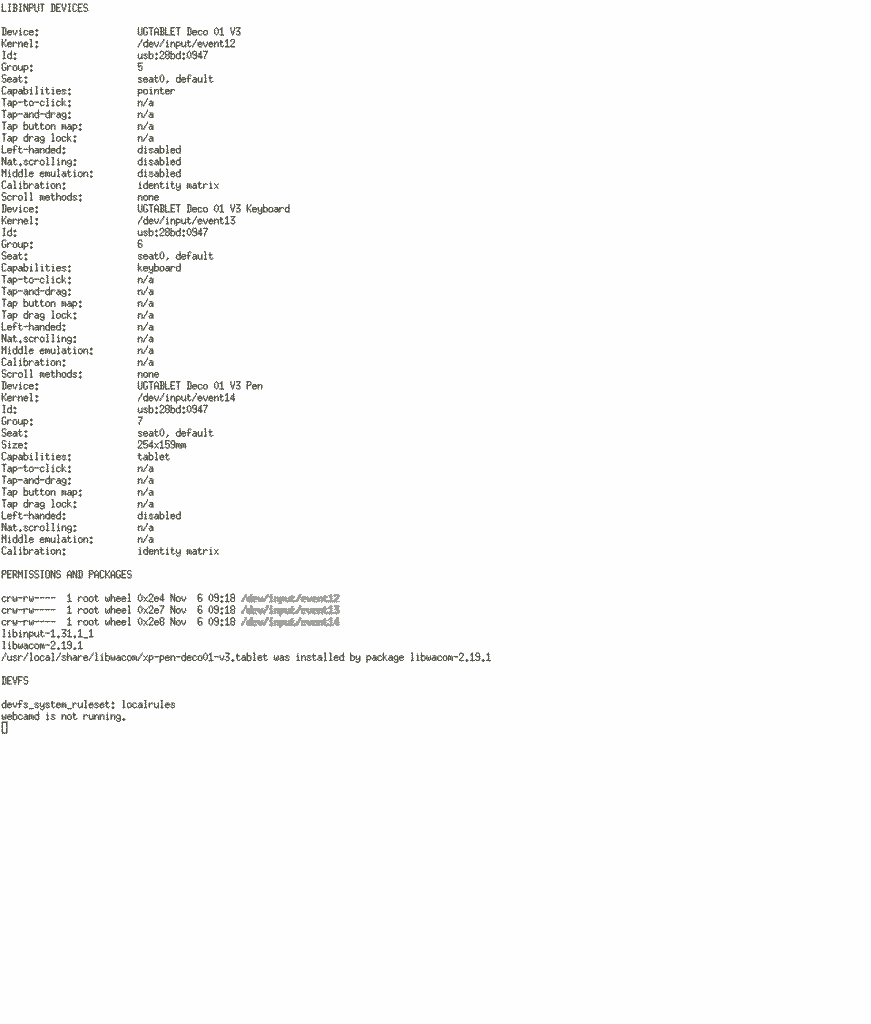
sudo libinput list-devicesThe tablet appeared as three separate devices:
| Device name | Event node | Capability |
|---|---|---|
| UGTABLET Deco 01 V3 | /dev/input/event12 | Pointer |
| UGTABLET Deco 01 V3 Keyboard | /dev/input/event13 | Keyboard |
| UGTABLET Deco 01 V3 Pen | /dev/input/event14 | Tablet |
The pen entry reported:
Device:                  UGTABLET Deco 01 V3 Pen
Kernel:                  /dev/input/event14
Id:                      usb:28bd:0947
Capabilities:            tablet
Size:                    254x159mmCode language: HTTP (http)
This confirms that libinput identifies the pen as a tablet device, separately from the pointer and keyboard interfaces.
The event numbers are the ones reported by my system during this test. They should not be assumed to be the same on another installation.
4. Configuring input device permissions
During troubleshooting, I found that the input event devices needed appropriate permissions for my regular user account.
My user is a member of the wheel group. I checked this with:
idThe relevant part of the output was:
groups=0(wheel),4(tty),5(operator),44(video),47(realtime),...I configured /etc/devfs.rules as follows:
[localrules=10]
add 100 path 'input/event*' mode 0660 group wheel
add 200 path 'usb/*' mode 0660 group wheel
add 300 path 'usbconfig' mode 0660 group wheel
add 400 path 'ugen*' mode 0660 group wheelCode language: JavaScript (javascript)
The rule directly relevant to the input event devices is:
add 100 path 'input/event*' mode 0660 group wheelCode language: JavaScript (javascript)I enabled this ruleset in /etc/rc.conf:
devfs_system_ruleset="localrules"I verified the setting with:
sysrc devfs_system_rulesetThe result was:
devfs_system_ruleset: localrulesCode language: HTTP (http)I then restarted devfs and checked the tablet’s event devices:
sudo service devfs restart
ls -l /dev/input/event12 /dev/input/event13 /dev/input/event14
The event nodes had read/write permissions for the owner and group (rw-rw----, or mode 0660).
The additional usb/*, usbconfig, and ugen* rules are also present in my configuration. They grant broader access to USB-related device nodes; they are not all required merely to describe the input-event permission rule. Review the security implications before copying these broader rules to another system.
5. Confirming the libinput and libwacom packages
The installed package versions on my system are:
pkg info libinput libwacomMy output showed:
libinput-1.31.1_1
libwacom-2.19.1Code language: CSS (css)
I also checked whether the installed libwacom package supplied a definition for the Deco 01 V3:
pkg which /usr/local/share/libwacom/xp-pen-deco01-v3.tabletThe result was:
/usr/local/share/libwacom/xp-pen-deco01-v3.tablet was installed by package libwacom-2.19.1This confirms that the device definition is part of the installed libwacom package; it was not necessary for me to create or manually install that file.
The definition identifies the tablet using its USB vendor and product IDs (28bd and 0947).
6. Testing pen pressure in GIMP
Recognizing the tablet at the operating-system level is only part of the test. I also wanted to verify that pen pressure was reaching a real application.
I tested the tablet in GIMP. With the Pencil tool selected, I set Dynamics to Size and drew several strokes using different amounts of pressure.
The result confirmed that pressure sensitivity was working:
- Lighter pressure produced thinner lines.
- Greater pressure produced thicker lines.
This is the end-to-end test: the tablet was not merely moving the pointer; GIMP was responding to pressure from the pen.
The screenshots below show the selected tool, the pressure-sensitive dynamics setting, and the resulting strokes from this machine.
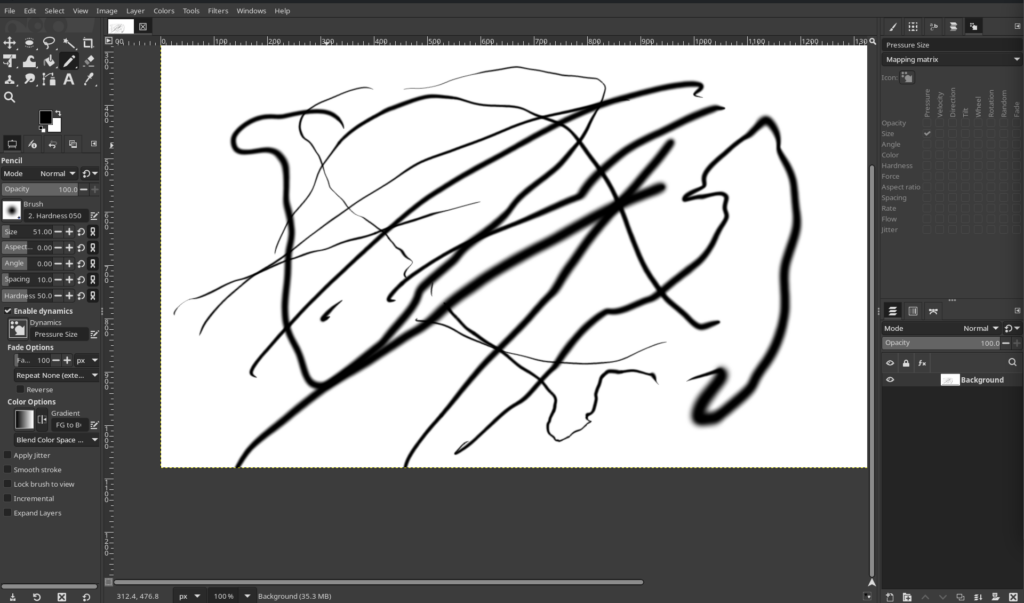
GIMP’s Pencil tool is using Pressure Size; the canvas contains light-to-heavy strokes with visibly different widths.
7. Testing pen pressure in Krita
Repeat the GIMP procedure in Krita with a freehand brush preset configured to use pressure for size or opacity. Capture the selected brush settings and the resulting light-to-heavy strokes together; the visible variation is the evidence that Krita is receiving pressure.
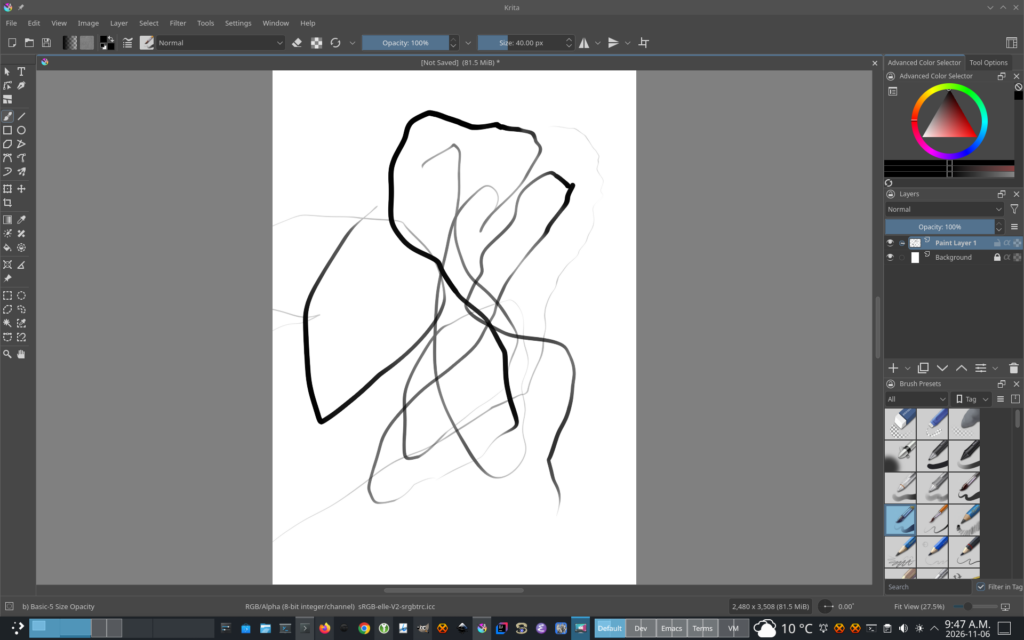
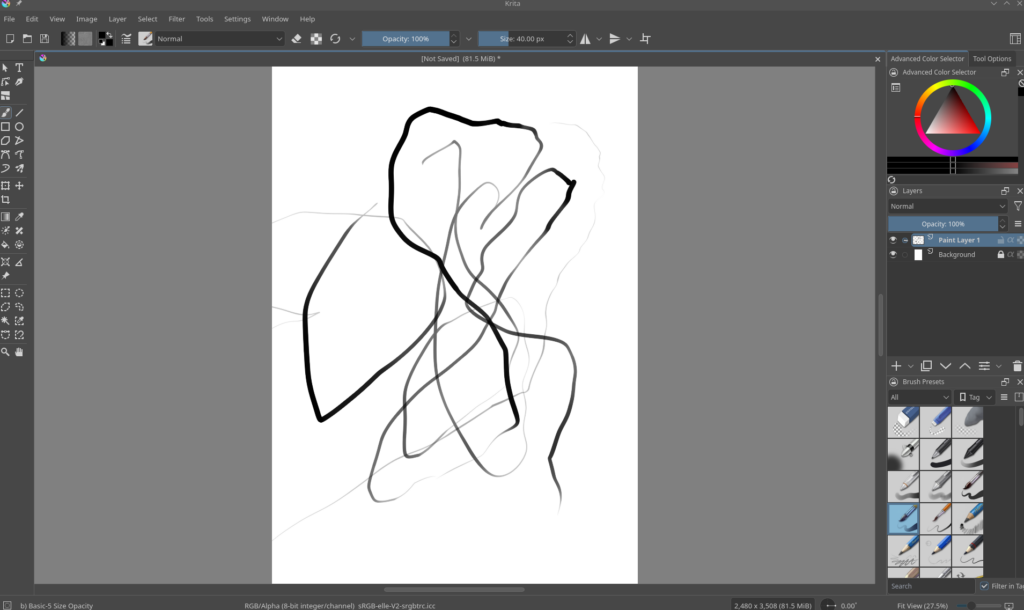
These Krita captures show the pressure-test strokes and the resulting variation in line width.
8. What I did not need
I experimented with a few other approaches during troubleshooting, but they are not part of the working configuration described in this post.
OpenTabletDriver
I did not need to install OpenTabletDriver. FreeBSD was already detecting the tablet through its native HID support, and libinput could identify its separate interfaces.
webcamd
I experimented with webcamd during the initial troubleshooting, but it did not provide the solution. I checked its current status with:
service webcamd statusThe result was:
webcamd is not running.The tablet works in my current setup without webcamd running.
Xorg configuration and XInput mapping
My current desktop session is KDE Plasma Wayland. Earlier Xorg-specific troubleshooting, including XInput mapping, is not part of the working configuration documented here. Those steps should not be followed as requirements for this Wayland setup.
Conclusion
The XP-Pen Deco 01 V3 works on my FreeBSD 15.1-STABLE system with KDE Plasma Wayland.
FreeBSD detects the tablet through its native HID interfaces, and libinput identifies the pointer, keyboard, and pen devices separately. I configured devfs permissions for the input event devices, confirmed that the installed libwacom package includes a definition for this model, and tested pen pressure successfully in GIMP.
I did not need OpenTabletDriver, and webcamd is not running in my working setup.
Hopefully this is useful to other FreeBSD users who want to use an XP-Pen Deco 01 V3 with KDE Plasma Wayland.
Evidence and commands at a glance
For convenience, these are the commands used to verify the setup:
# Operating system and session
freebsd-version -ku
uname -a
echo "$XDG_SESSION_TYPE"
echo "$WAYLAND_DISPLAY"

# USB detection
usbconfig list

# Kernel HID messages
dmesg | grep -Ei 'UGTABLET|28bd|0947|hms|hkbd|hpen'

# Input devices
sudo libinput list-devices

# User groups and device permissions
id
ls -l /dev/input/event*

# devfs configuration
cat /etc/devfs.rules
sysrc devfs_system_ruleset
sudo service devfs restart
ls -l /dev/input/event12 /dev/input/event13 /dev/input/event14

# libinput and libwacom packages
pkg info libinput libwacom
pkg which /usr/local/share/libwacom/xp-pen-deco01-v3.tablet

# webcamd status
service webcamd status